You walk into a store, see “65-inch TV,” and think you know what you’re getting. Then it arrives home and looks nothing like what you imagined. That gap between the number and reality is what this is about.
The One Rule That Confuses Everyone
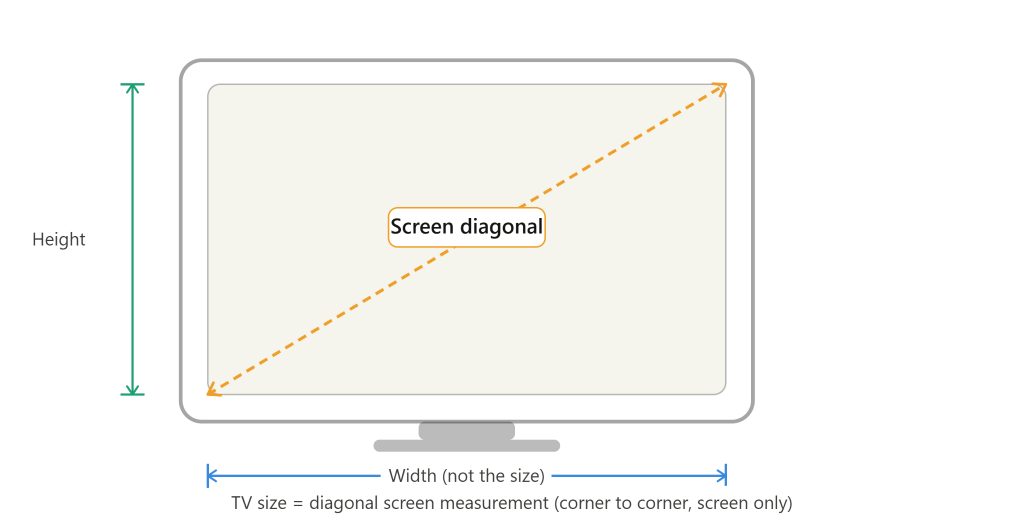
TV size is measured diagonally — corner to corner across the screen. Not the width. Not the height. The diagonal.
That single fact explains almost every sizing surprise people experience. A 65-inch TV is not 65 inches wide. It’s 65 inches from the bottom-left corner of the screen to the top-right corner. The actual width of that same TV is closer to 57 inches, and its height (without the stand) runs around 33 inches.
This diagonal convention comes from the early days of television, when circular cathode-ray tubes were measured by their diameter. As screens became rectangular, manufacturers kept the diagonal as the standard. It stuck, and here we are.
Quick Reference: Common TV Sizes at a Glance
| Screen Size | Approx. Width | Approx. Height |
| 43-inch | ~37.5 in / 95 cm | ~21 in / 53 cm |
| 55-inch | ~48 in / 122 cm | ~27 in / 69 cm |
| 65-inch | ~57 in / 145 cm | ~32 in / 81 cm |
| 75-inch | ~65 in / 165 cm | ~37 in / 94 cm |
| 85-inch | ~74 in / 188 cm | ~42 in / 107 cm |
Heights are for the screen panel only. Add 2–5 inches for the stand.
How to Actually Measure Your TV
If you want to confirm the screen size on a TV you already own, grab a soft tape measure or a piece of string. Start at one corner of the visible screen — not the plastic bezel, not the frame, just the lit glass — and stretch it to the opposite corner diagonally. That number is your TV’s screen size.
The bezel matters more than people think. Older TVs had bezels an inch or more thick. Many modern TVs have bezels under half an inch. Two TVs sold as “55-inch” can have noticeably different total widths depending on how thick those borders are. When you’re fitting a TV into a cabinet or on a specific wall, measure the full unit — width including the frame, height including the stand.
Measuring for Your Space
Knowing the diagonal doesn’t tell you whether the TV fits your wall or your entertainment unit. For that, you need two separate measurements.
Total width is what matters for shelves and TV stands. Measure the TV from its leftmost edge to its rightmost edge, frame included. Most manufacturers list this in the spec sheet as “width with stand” or “width without stand.”
Viewing distance is what many people forget entirely. A screen that feels comfortable at 10 feet can feel overwhelming at 5 feet. A commonly used guideline is that your viewing distance should be roughly 1.5 to 2.5 times the screen’s diagonal. So for a 65-inch TV, comfortable seating commonly falls somewhere between 8 and 13 feet away. Closer distances work better with higher resolution panels where fine detail stays sharp.
Stand footprint is the measurement people overlook until the TV is already home. The stand legs on a 75-inch TV might spread 50 or more inches apart — wider than the screen itself on some models. Check your TV stand or shelf width against the stand leg spread, not just the screen width.
What the Specs Page Is Really Telling You
When you read a TV’s spec sheet, you’ll see something like this: Screen Size: 65″, Width: 57.1″, Height: 32.7″, Weight: 51.8 lbs. The 65 inches refers only to the diagonal screen measurement. Everything else describes the physical box that shows up at your door.
Resolution doesn’t change the physical size — a 65-inch 4K TV and a 65-inch 1080p TV are exactly the same physical size. What changes is how sharp the image looks and how close you can sit before the picture starts to look pixelated.
FAQ’s
Does TV size include the bezel?
No. The advertised size — say, 55 inches — refers only to the diagonal of the visible screen area, not the outer plastic or metal frame. The total width of the TV will be larger once you include the bezel.
Why do two 65-inch TVs look different sizes in the store?
Thinner bezels make the screen appear larger relative to the total unit footprint. Two televisions with identical 65-inch screens can look noticeably different when one has a 0.3-inch bezel and the other has a 1-inch bezel.
How do I know what TV size fits my wall?
Measure the width of your wall space first. A 75-inch TV is commonly around 66 inches wide with bezel included. Leave at least a few inches of clearance on each side so the TV doesn’t feel crammed. Then check viewing distance — if your couch is only 6 feet away, a 75-inch screen will likely feel too large.
Can I measure a TV without a tape measure?
Use a piece of string or a charging cable stretched corner to corner across the screen, then measure that length against a ruler or door frame. It’s less precise but works in a pinch when you’re trying to confirm a size before buying.
The diagonal number on the box is a starting point, not the whole story. The measurements that actually matter for your room are width, stand spread, and viewing distance. Get those three right and the TV will feel exactly as big as you hoped it would.